
Take a look at our Portfolio!

How to create a Google Ads account

With Google recently making it free to advertise on Google shopping and average cost-per-click falling across the board, now’s a great time for a lot of businesses to take advantage of Google Ads.
In this blog, we’ll walk you through the process of setting up a Google Ads account, which to some, may seem daunting.
Enter an email address
The first step is to enter the email address you wish to use to manage and sign into your account with. If you’re using other Google features/platforms already, such as Google Ads, use this Google email and sign in.
Select your advertising goal
Once you sign into your Google account in the previous step, whilst at ads.google.com, you will be prompted to choose your advertising goal. In this blog, to provide the most detailed setup, select “Switch to Expert Mode” at the bottom of the page. You will be presented with the following page.
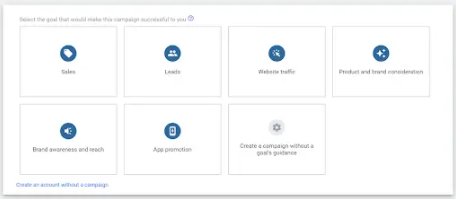
Feel free to create a campaign, however we would recommend skipping this step until you’re more familiar with the
platform.
Enter business information
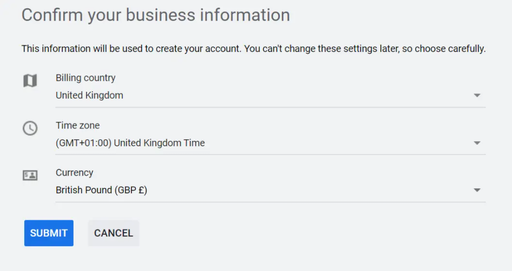
On the next page, you will be promoted to provide some business information. This information will be used to create
your account, so it’s extremely important that the information you provide is accurate. This information cannot be
changed in the future.
Enter a budget
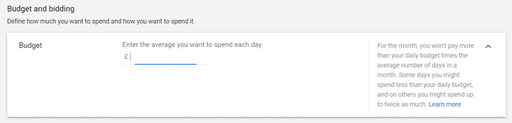
After submitting your business information, you’re able to explore your account and will be sent to a screen letting you know that the account creation has finished. However, inputting a budget is a crucial step in a Google Ad account setup. To do this, you will need to have created a campaign. During the first stage of campaign setup, you will be provided the option to enter your budget.
Setup billing details
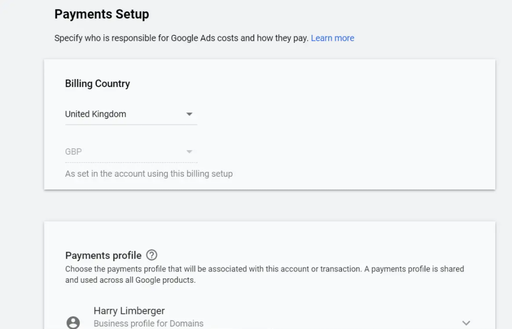
Without registered billing details, your Google Ads won’t be shown across the Google network. It is therefore vital that accurate billing details are provided.
To set up billing details, navigate to “Tools & Settings” located along the main navigation bar. From the drop down menu, select Billing > Summary. This will send you to the payments setup page, where a number of details will be required.
Ad creation
Before you deepdive into the technicalities of ad writing, it’s good to take a clear step back and identify the audience you wish to target. This will ultimately determine your ad content and writing style. There are a lot of aspects of a business that can aid in ad creation - use them to your advantage.
Brand: Use other marketing assets to your advantage and borrow them, saving time and ensuring messaging remains consistent across marketing channels.
Product/Service: The content that you provide in your text ad should reflect your product or service offering, highlighting any unique selling point you may have over competitors.
Goal: Outline the end action you wish users to complete on your website. Use this messaging as a call to action in your text ads.
Creating a keyword list
You’ll often hear marketers talking about ‘keywords’. That’s because they’re a fundamental element to almost any marketing strategy and PPC is no different. These
keywords will form the basis of your campaign and will be the keyphrases that you bid on.
There are a few key areas that are helpful as you begin to build out your keyword portfolio:
- Company website – A website is typically peppered with core words and phrases that describe your business. Reviewing the website layout will also help identify any major themes and can help drive the structure of your campaigns.
- Keyword research tools – We recommend leveraging these tools to help you expand upon the core list you have pulled from the website. Most tools will also give you insight into volume, competition, as well as recommend starting bids. These tools will also help you identify keyword variations and synonyms. There are a ton of tools available to perform research.
- Think like your customer – Take a step back and put yourself in the customer’s shoes. What would someone who’s looking for your product or service type into a search engine. Oftentimes you will find people searching for a problem you have a solution to.
- Don’t forget brand terms – Seems obvious enough but there is value in showing up in both paid and organic on your branded keywords.
Initial Setup
The above steps are the basics of getting a Google Ads account launched. After setup, it’s a process of reviewing analytics and subsequently optimising your account. Google Ad accounts require constant reviews and updates, in order to ensure they’re operating efficiently and cost-effectively.
If you require help setting up a Google Ads account or wish your account to be managed by professionals, get in touch today.
